
Artificial intelligence has changed how we think about creativity. Instead of spending hours on drawings, product shots, or editing software, AI tools can now do much of the heavy lifting. One of the most versatile tools in this space is Prome AI is a platform designed not just for making random AI art, but for helping professionals and everyday users create polished visuals quickly.
In this review, we’ll explore what PromeAI does, how it works, its main features, pricing, strengths, limitations, and how it compares to alternatives.
What is PromeAI?
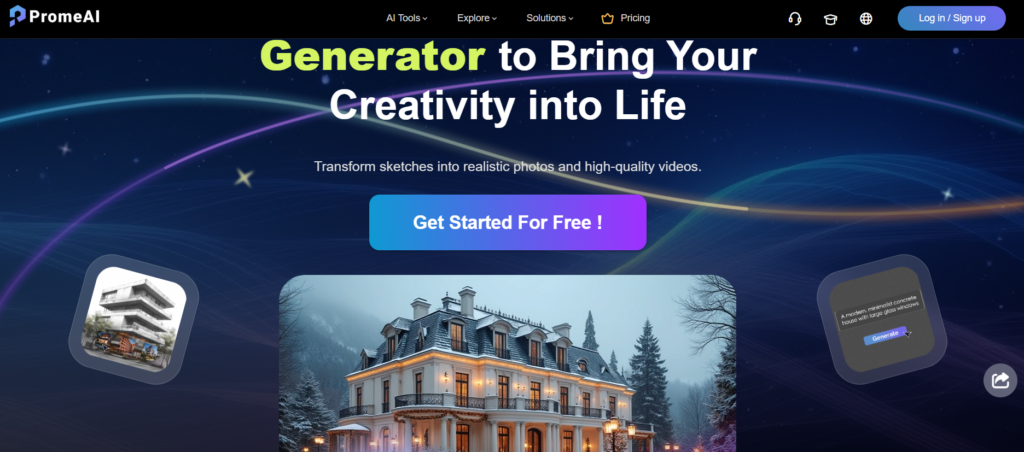
PromeAI is a browser-based AI design platform that combines several creative tools into one. While most AI art generators focus on fun, surreal, or experimental outputs, PromeAI is built for practical design needs.
It can:
- Turn a hand-drawn sketch into a realistic rendering.
- Generate lifelike human models for fashion or e-commerce.
- Animate still images into short video clips.
- Edit or replace image backgrounds for cleaner visuals.
This focus on real-world design workflows makes it useful not just for artists, but also for architects, fashion brands, marketers, and students.
How to Use PromeAI
The platform is designed to be simple.
- Sign up on the website.
- Choose whether to start with a text prompt, a sketch, or an uploaded image.
- Pick a style, background, or layout to guide the design.
- Adjust settings like creativity sliders or negative prompts to refine results.
- Generate, review, and download your final output.
Because everything runs in the browser, there’s no software installation needed, and you can switch between devices easily.
Key Features of PromeAI
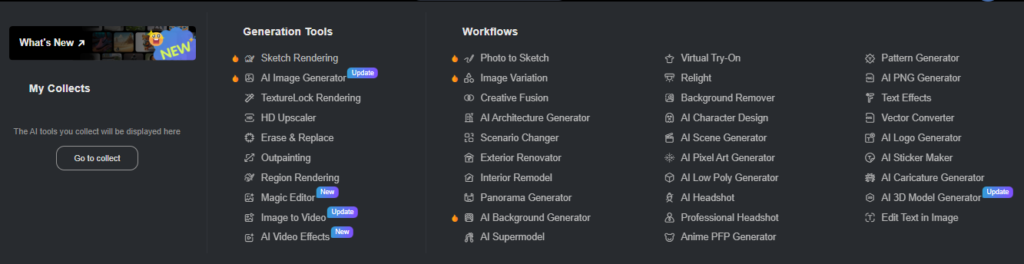
Here’s a closer look at what PromeAI can do, with examples of how each feature works:
- Sketch Rendering: Take a hand-drawn sketch or floor plan and instantly convert it into a realistic design. Useful for architects, students, and product designers who want quick visualization.
- AI Image Generation: Type a description, and PromeAI creates an image in styles ranging from anime to photorealism. For example, a marketer could generate different ad backgrounds in seconds.
- AI Supermodel: Fashion and e-commerce brands can generate lifelike models wearing specific outfits, saving the cost of photo shoots while still producing catalog-ready visuals.
- Image-to-Video: Animate static images into short video clips. This feature is perfect for social media ads or product demos that need movement to grab attention.
- Background Editing: Clean up product shots by removing or replacing backgrounds. Great for online stores needing consistent catalog photos.
- Photo-to-Sketch: Reverse the process by turning photos into artistic sketch-like drawings. Handy for presentations or adding creative effects.
- Text Effects & Layout Tools: Add typography, titles, or layouts directly within PromeAI for posters, flyers, or campaigns.
- Advanced Controls: Adjust creativity sliders, choose presets, or apply negative prompts to fine-tune results and avoid errors.
Pricing of PromeAI
PromeAI uses a coin-based system, where each action consumes credits. Plans are structured around monthly usage:
- Free Plan: No cost, limited credits, good for testing features.
- Base Plan: Around $16 per month, includes 500 coins, suitable for light users.
- Standard Plan: Around $29 per month, includes 2,000 coins and access to video generation.
- Pro Plan: Around $59 per month, includes 6,000 coins, commercial usage rights, and faster processing.
For long-term users, annual billing reduces the overall cost.
Pros and Cons of PromeAI
Pros:
- Simple, browser-based platform with no installation required.
- Converts rough sketches into polished, realistic renders.
- Wide range of tools in one place (models, video, backgrounds, text).
- Affordable compared to traditional design software and photo shoots.
- Free plan available to try before upgrading.
Cons:
- Free plan is very limited and mainly for testing.
- Some results need manual editing for a professional finish.
- Credit system may run out quickly for heavy users.
- Commercial rights only included in higher plans.
Who Should Use PromeAI?
PromeAI is designed for:
- Architects & Interior Designers: Present professional-looking renders of sketches without CAD software.
- Fashion & E-commerce Brands: Generate catalog-ready model and product shots.
- Marketers & Social Media Teams: Produce ad creatives, posters, and short video clips on demand.
- Students & Educators: Explore styles and concepts for assignments or creative projects.
Not ideal for:
- Artists seeking surreal, stylized outputs (MidJourney is stronger).
- Developers needing custom AI pipelines (Stable Diffusion is more flexible).
Alternatives of Prome AI
If PromeAI doesn’t cover your needs fully, here are some other options worth considering:
- MidJourney: Produces highly artistic, dreamlike imagery but lacks practical editing tools.
- DALL·E 2: Generates imaginative, creative outputs from text but offers less control.
- Stable Diffusion: Open-source and customizable, great for developers or advanced users.
- Canva AI: Ideal for quick social media graphics and branding.
- Adobe Firefly: Integrated into Creative Cloud, good for professionals already using Adobe products.
A Quick Test: From Sketch to Realistic Room
To see how well PromeAI performs, we tested the Sketch Rendering feature. We uploaded a rough drawing of a living room and added a simple prompt: “make this like a realistic room.”
Within seconds, PromeAI generated multiple photorealistic versions of the room. Each result captured the layout of the original sketch while adding natural textures, lighting, and furniture styles.
This shows how architects, interior designers, or even students can turn basic sketches into presentation-ready visuals without using complex 3D software.
A Smarter Way to Create
PromeAI takes the hassle out of design by turning rough ideas into polished results in minutes. Whether it’s sketch rendering, product imagery, or quick marketing assets, it offers a practical set of tools that save time without sacrificing quality.
The free plan is a good way to explore, but the real value comes with the Standard and Pro plans, especially for professionals who need reliable outputs.
In 2025, PromeAI proves that AI isn’t just for art experiments, it’s a smarter, faster way to create.
FAQs
1. Does PromeAI require a powerful computer to run?
No, PromeAI is entirely web-based, so all processing happens on the cloud. You only need a stable internet connection and a modern browser.
2. Can PromeAI generate designs in different art styles?
Yes, PromeAI supports a wide variety of styles from anime and sketches to realistic photography and 3D-inspired renders, making it flexible for different creative needs.
3. Is PromeAI suitable for professional client projects?
Yes, especially on the higher-tier plans that include commercial rights. Many designers, marketers, and e-commerce brands use it for real-world projects like product catalogs, ad campaigns, and client presentations.
4. Does PromeAI allow image customization after generation?
Yes, you can refine results by editing backgrounds, adjusting text, or regenerating elements until the output matches your needs.
5. How does PromeAI compare to traditional design software?
Traditional tools like Photoshop or CAD software offer full manual control but require expertise and time. PromeAI, by contrast, prioritizes speed and accessibility, letting anyone create usable designs in minutes.

