
What is Midjourney?
Have you ever wondered how you can create stunning, high-quality images without needing to be a professional designer? Midjourney is an AI image generator that lets you turn simple text prompts into incredible images. Whether you’re an artist, marketer, or just someone looking to create unique visuals, Midjourney offers a powerful tool to help you generate custom images in no time.
In this article, we’ll dive into how Midjourney works, its standout features, and why it’s considered one of the best AI image generators available today.
Testing Midjourney
Testing Midjourney is all about assessing how well the tool can take a written prompt and turn it into a visually compelling image. Here’s how it performs across different areas:
- Ease of Use
Midjourney is relatively easy to use. You simply enter a description of the image you want, and the AI works its magic to generate an image. While the interface is clean and user-friendly, you may need to learn some tricks to get the most out of it. - Image Quality
Midjourney generates highly detailed, visually stunning images. The results often feel polished, realistic, and artistic. Whether you need something abstract or highly realistic, Midjourney consistently delivers high-quality visuals. - Customization
Midjourney offers customization options where you can influence the style, tone, and specific elements of the image. While not as granular as some other tools, it does allow you to experiment and refine your results. - Speed
The tool is relatively fast. Depending on the complexity of the image, Midjourney generates outputs in just a few minutes, which is impressive when you consider the level of detail in the images.
Key Features of Midjourney
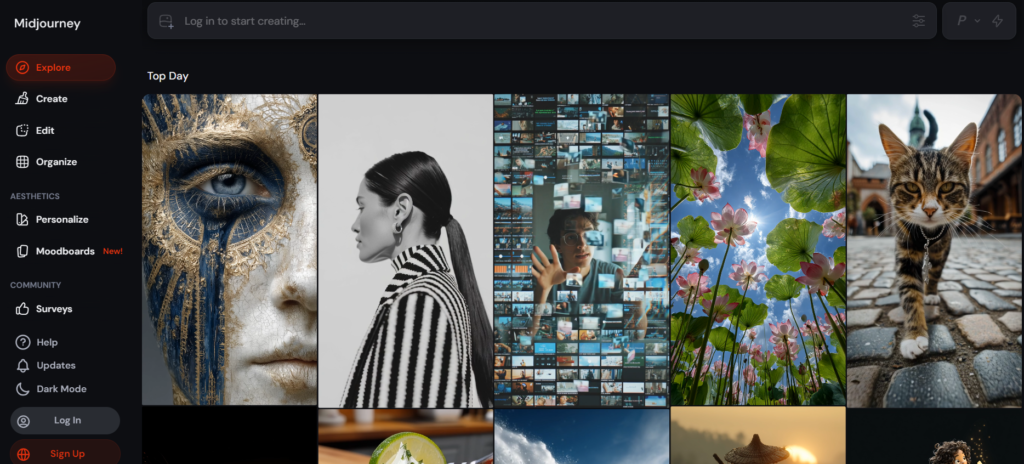
Midjourney offers a wide range of features designed to help you create AI-generated images with ease. Here are some of its key features:
- Text-to-Image Conversion
The core feature of Midjourney is its ability to turn text prompts into high-quality images. Whether you need an abstract piece or something realistic, the AI interprets your description and brings it to life. - Multiple Style Options
Midjourney offers different style presets to create various types of artwork, from photorealistic images to more artistic and abstract designs. The flexibility in styles allows users to choose the right one for their project. - High-Quality Outputs
The images generated are not only detailed but also come in high resolution. This makes Midjourney a great tool for creating everything from social media content to digital art projects. - Easy Iteration
After generating an image, you can refine it further by providing additional input or tweaking the prompt. This iterative process helps you get closer to the vision you have in mind. - Community and Collaboration
Midjourney also offers a unique feature where users can join a community of creators. You can see other users’ images, share your work, and even collaborate on projects, making it a great tool for networking and inspiration. - Fast Generation Time
Midjourney produces results in a short amount of time, even for highly detailed or complex prompts. The quick turnaround is perfect for those who need images for fast-paced projects.
Tool Benchmarks Table
Here’s a simple overview of Midjourney’s performance based on key features:
| Feature | Performance Rating | Notes |
| Text-to-Image Conversion | 9/10 | Highly accurate, delivers high-quality results |
| Multiple Style Options | 8/10 | Offers a range of artistic styles, though more variety would be welcome |
| High-Quality Outputs | 9/10 | Produces high-resolution, detailed images suitable for various uses |
| Easy Iteration | 8/10 | Allows for iterative refinement, though it could be more flexible |
| Community & Collaboration | 8/10 | Great for inspiration and networking, but limited for large collaborations |
| Fast Generation Time | 9/10 | Quick and efficient image creation, even for complex prompts |
How to Access Midjourney
Getting started with Midjourney is easy and intuitive. Here’s how you can begin using this powerful AI image generator:
- Sign Up for an Account
To access Midjourney, you’ll need to create an account. You can find the registration link on the Midjourney website. - Select a Plan
Midjourney offers different pricing tiers depending on how much you plan to use the service. There is a free trial option, but paid plans offer more features and faster image generation. - Enter Your Prompt
Once you’ve signed up, enter a text description of the image you want. You can get as creative or specific as you like with your prompt. - Choose a Style
Midjourney provides various style options for you to choose from. You can select your preferred style or leave it open-ended for the AI to decide. - Generate the Image
After entering your prompt and selecting a style, hit the generate button, and Midjourney will create your image within minutes. - Iterate and Refine
Once the image is generated, you can refine it by providing additional details or feedback to the AI, helping you get closer to the desired result. - Download Your Image
Once you’re happy with the generated image, you can download it in high resolution and use it for your project.
Pros and Cons of Midjourney
Midjourney has many advantages, but there are also areas where it could improve. Here’s a quick breakdown:
Pros:
- High-Quality Images
The images Midjourney generates are of exceptional quality, often surpassing other AI image generators in terms of detail and realism. - Multiple Styles
The variety of styles available gives users flexibility in the type of image they want to create, whether it’s abstract, realistic, or artistic. - Fast and Efficient
Midjourney’s quick generation time makes it an excellent tool for projects with tight deadlines. - Easy Iteration
The iterative process allows you to refine your images and get closer to your vision. - Community Engagement
The platform’s community features offer inspiration and collaboration opportunities, fostering a creative environment.
Cons:
- Limited Granular Customization
While the tool offers multiple style options, some users may feel limited in how much they can customize the finer details of their images. - Free Plan Limitations
The free plan offers limited functionality, and users may need to upgrade to a paid plan for full access to all features. - Complex Prompts May Require Refinement
While the AI is impressive, it might not always interpret complex or very specific prompts perfectly, requiring multiple iterations.
Conclusion
Midjourney is a standout AI image generator that makes it easy to create high-quality images with just a simple text prompt. Whether you need images for social media, websites, or creative projects, this tool offers an impressive level of quality, speed, and customization.
While there are some areas for improvement, particularly in terms of fine-tuning customization, Midjourney’s ability to generate detailed, high-resolution images quickly makes it one of the top choices in the AI image generation space. Its community features also add a unique element of collaboration and inspiration.
If you’re looking for a powerful tool to help you create AI-generated images with ease, Midjourney is certainly worth exploring. With its exceptional quality and user-friendly interface, it stands as one of the best in the image generation game.

